
Understanding Addon Domains
An addon domain is an additional domain name that you can add to your hosting plan, allowing you to host multiple websites under a single hosting account. Here’s a detailed overview of how addon domains work and how to manage them:
What is an Addon Domain?
An addon domain is a fully functional domain that can be added to your hosting account. It operates independently, similar to a primary domain. You can set up email addresses, create forwarders, and manage it just like you would with your main domain.
When you create an addon domain, a new folder is created in the root directory with the domain name. This folder can be customized if you specify a different name or path. The primary domain will automatically link to this new folder, often using a subdomain format like [addon].maindomain.com, which can be useful for previewing the new site.
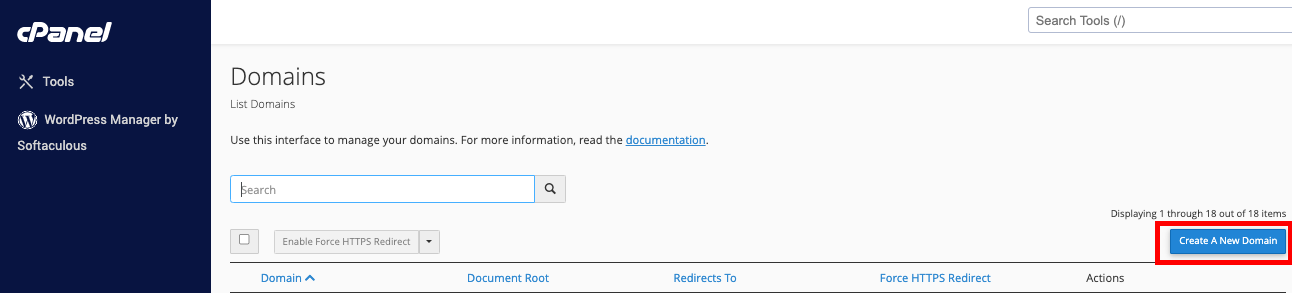
How to Add an Addon Domain
- Log in to cPanel.
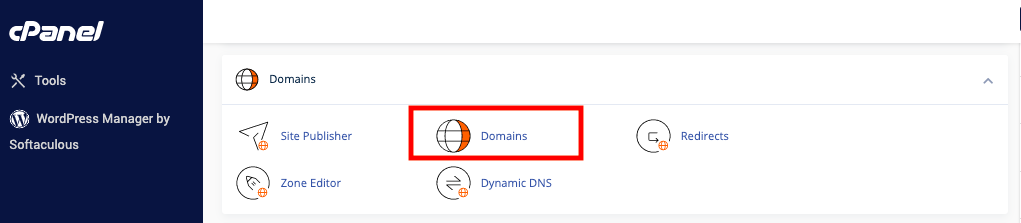
- Navigate to the Domains section.
- Click on "Addon Domains."
- Enter your new domain name at the top of the page.
- Specify the location of the document root in the last field.
Note: Ensure that the domain is registered before adding it to your hosting account. If the domain name is already in use or appears similar to an existing domain on your account, you will be prompted to create a subdomain instead. You can manage subdomains by going to cPanel -> Home -> Domains -> Subdomains.
Creating Multiple Addon Domains with Different Extensions
To create multiple addon domains with different extensions (e.g., example.net and example.com), enter a unique username in the Subdomain text box. This ensures that each addon domain is distinct.
Managing Addon Domains Limits
The maximum number of addon domains you can create is displayed in the cPanel Statistics Sidebar. For Resellers, this limit can be adjusted in WHM by navigating to WHM > List Accounts > Modify Account > Max Addon Domains.
Troubleshooting Zone Files
If you encounter errors due to incorrect zone files while adding an addon domain, you can use the Zone Editor to correct them:
- Log in to cPanel.
- Navigate to the Domains section.
- Click on "Zone Editor."
- Correct any issues with the zone files.
If you need assistance with zone files or encounter any issues, feel free to reach out to our support team.
Summary
Addon domains provide a flexible way to manage multiple websites from a single hosting account. By understanding how to add, manage, and troubleshoot addon domains, you can efficiently handle your domain needs and ensure your websites run smoothly.
