
Understanding Subdomains and How to Use Them
When browsing a website, you might notice that the URL changes based on different sections or pages. This variation is often due to the use of subdomains. A subdomain is an additional part of your main domain name and is used to organize and navigate different sections of your site. Here's a closer look at subdomains and how you can effectively use them:
What is a Subdomain?
A subdomain is a prefix added to your main domain name, separated by a dot. It helps in dividing your website into various segments or distinct sections. For example, in the URL blogname.com, the root domain is blogname.com, while sport.blogname.com and fashion.blogname.com are subdomains created for specific topics or sections of the blog.
Common Uses of Subdomains
-
Organize Website Content: Subdomains are often used to segment different functions or sections of a website. For example:
blog.example.comfor a blogstore.example.comfor an online storeforum.example.comfor a discussion forum
-
Language Versions: You can use subdomains to offer different language versions of your website:
en.example.comfor Englishfr.example.comfor French
-
Mobile Versions: Create a mobile-friendly version of your website:
m.example.comfor a mobile site
-
Special Sections or Single Pages: Subdomains can also direct users to specific sections or pages:
hireme.example.comfor a personal portfolio or contact form
-
Geographic Segmentation: Create regional subdomains:
north.example.comandsouth.example.comfor different geographic locations
How to Add a Subdomain in cPanel
-
Log into cPanel: Navigate to your cPanel dashboard.
-
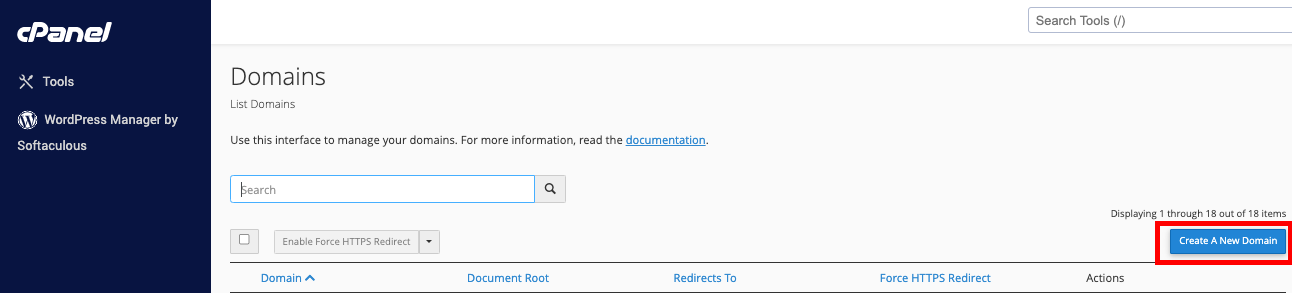
Go to the Domains Section: Click on “Domains” to access the subdomain management interface.
-
Create a New Subdomain:
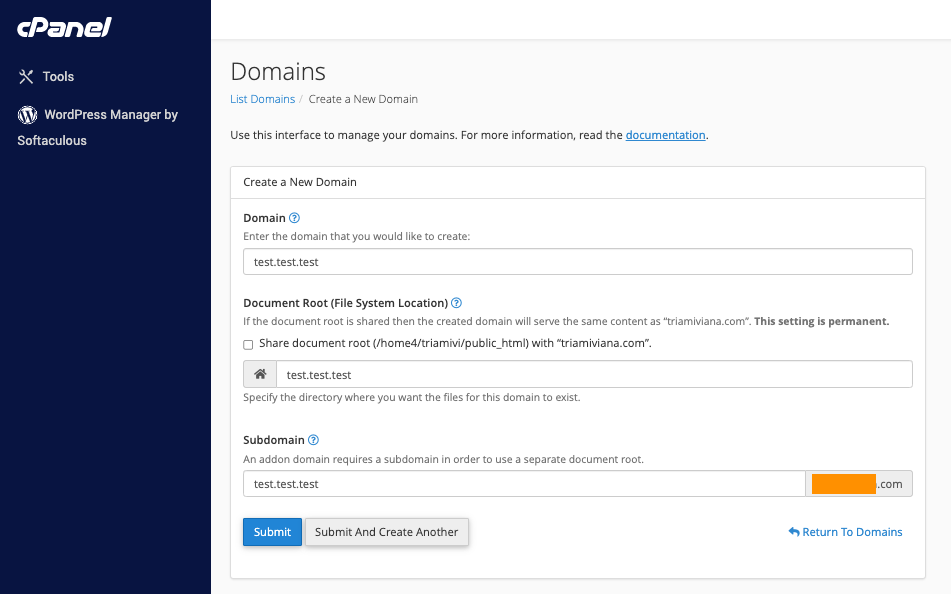
- Click on “Create A New Domain.”
- Enter your desired subdomain in the first field (e.g., “north” for
north.example.com). - In the “Domain” field, select the domain name to which you are adding the subdomain.
- Specify the “Document Root,” which is the directory where the subdomain’s files will be stored (e.g.,
public_html/north).
-
Save Changes: Click “Create” to finalize and add the subdomain.
Conclusion
Subdomains are a valuable tool for organizing and managing your website’s content. They help in creating distinct sections or services, offering language-specific content, and segmenting your website for better user experience. By adding subdomains, you can effectively manage different aspects of your website and enhance its functionality.
